
Blends powerful photo editing with project templates
This program can no longer be downloaded. Take a look at ArcSoft PhotoStudio instead
ArcSoft PhotoImpression is a powerful, feature-filled photo editing application that doesn't make creating classy graphics too difficult to achieve.
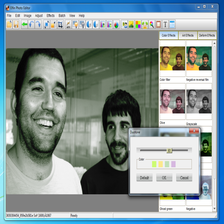
It has to be said that PhotoImpression pulls this off pretty well, and its colorful interface manages to marry some of the advanced features of programs like Photoshop with the simplicity of an app like the GIMP or IrfanView.
PhotoImpression's GUI is laid out in a way that leads you intuitively through the process of organizing, enhancing, and creating interesting looking photos and graphics, whether it's to share on the web, email to your pals, or print out.
Clicking each of the tabs that represent these stages of production will bring up a series of controls that help you perform a variety of tasks, from fixing problem photos to applying effects and frames to your images.It would have been nice to see support for more advanced manipulation tools such as layers and gradients in PhotoImpression, but for someone who's just retouching or revamping their snaps, this is ideal.
PhotoImpression performs admirably compared to the wonderful, if strangely-named, GIMP. However, perhaps the key difference with this and its open source rival is you must part with cash for the full version of PhotoImpression.


























User reviews about ArcSoft PhotoImpression
by Rob Roden
i have had this software a while...
now doesn't work...
tried to download and install here...
now, can't access it at all
by Anonymous
Do not purchase. Better types of this program to be had elsewhere. :(.
I purchasewd the program ( if you can call it that ) a few days ago. What a waste of time and money. Freezes all the time. You cannot access the net from it. Have to go to google to get here. Use your photos in a slide show and they are removed from files and folders and stuck in Photo impression. You have to make a copy to get it back. Old fashioned and almost featureless. You need all the programs to even have a half decent bit of software. I wouldn't recommend this product to anyone. More
by Anonymous
Photoimpression 6 install.
Yes the install is very frustrating. I am no pro, yet out of the 4 ports I have on my computer only one in the rear was capable of recognizing my plug. You will know when you found the correct one when it is able to calibrate. Hope this helps. More
by Anonymous
wont print.
After reinstalling Vista and installing all updates from Windows and H.P.
and reinstalling Photo Imp.program runs ok but will not print photos no solution found at the moment. More
by Anonymous
Rubbish No Supprt.
Kaiser Baas Photomaker that came with ArcSoft PhotoImpression which will not open. Uninstalled and reinstalled several times!
by Anonymous
Optex Scanner with Photoimpression 6.
OPTEX Digital Scanner. Complete waste of money. Will not install properly. Cannot scan anything. Tried several installs, no success. Windows XP will not recognize through "Plug and Play".
I googled, many had the same problems.
I am computer literate but this one really got me. Too much time spent to install and run.
I will unplug, uninstall and just chuck it. More